Data generated from BD LSR-Fortessa
IMPORTANT: No external HD or flash drives are permitted for use. Data generated from instruments or workstations of FCRC have to be moved to Rockefeller University File Store (RUFS, also called CFS) for storage or transferring to personal devices. For instructions click on Access FCRC data on CFS from PC and Mac. Extra information about RU data storage please refer to Rockefeller Cloud Storage & File Shares.
- No personal data should be stored on the C:\ or D:\ drives of the instrument
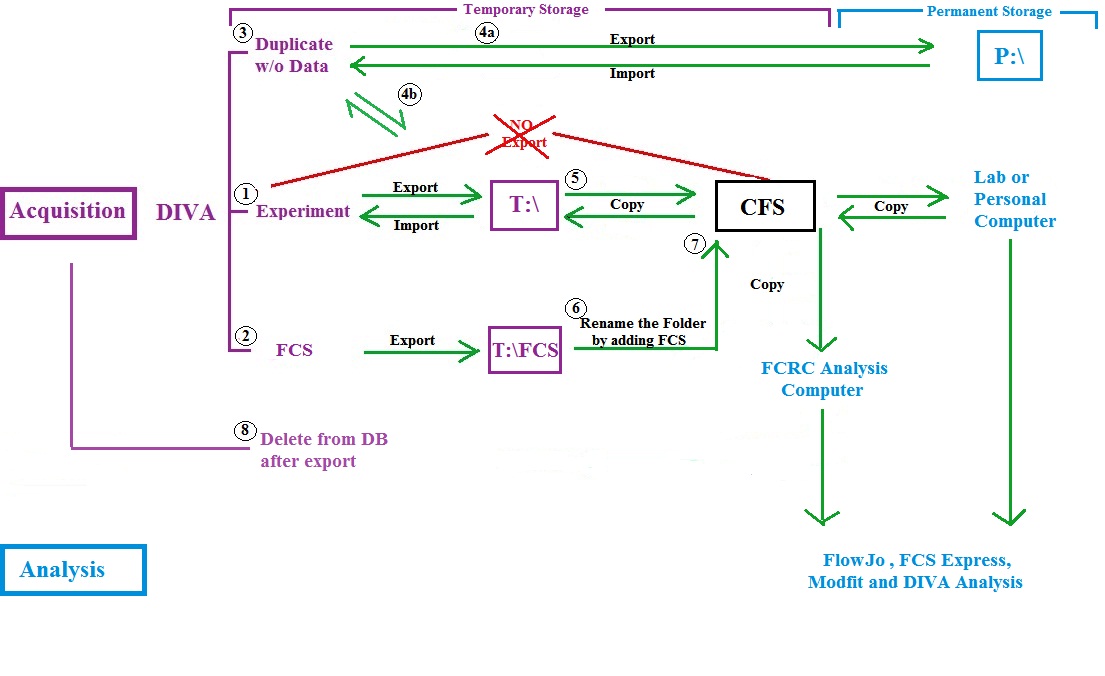
- Upon completion of the acquisition, the experimental files should be exported to the “T:\” drive on the instrument computer for temporary storage during sample acquisition or data analysis
- Researchers are responsible for promptly transferring experimental data to their designated CFS folder on RUFS. Once the transfer has been verified, all experimental data must be removed from the “T:\” drive, as well as from the instrument software
- Data storage on the “T:\” drive is not limited by quota, but is limited to seven (7) days retention time. After seven days of the date of export, the files will be automatically deleted
- Data within the DiVa software is not limited by quota, but is limited to seven (7) days retention time. After seven days from the date of acquisition, the files will be automatically deleted
- Researchers can save the experiment template on the “P:\” drive as the permanent data storage, which size is limited by quota to 200MB. Windows will not allow to store more than that amount
- Researchers are responsible for creating archival copies of their data, preferably within one day following cell acquisition:
- FCRC recommends that researchers make at least two copies of the data and store them in separate locations
- To conserve CFS space and costs, FCRC suggests removing originals from CFS once researchers have made copies of your data
- To make sure the data auto-transfer working properly, researchers must NOT delete or rename their designated folders on CFS
DETAILED INFORMATION for BD LSR-Fortessa Data Management
Hard Drives on BD LSR-Fortessa are set uniformly and split into several partition drives with different functionalities:
- C: (System)
- D: (BD Database)
- P: (Permanent)
- T: (Temporary)
To avoid possible data loss due to the operation of the system, please follow the instructions:
- Absolutely no experiments (with data or without data) is allowed to store in the BD FACSDiva Browser/Database (within BD FACSDiva). Experiments left in the BD FACSDiva Browser/Database will be automatically deleted weekly
- Absolutely no data should be stored at either C: (System) or D: (BD Database) drive
- Personal folder is automatically created at “P:\BDExport\Experiment\user login name”. Each researcher is allowed to keep permanently up to 200 Mb of data in the folder, where several essential Experiments and Templates can be kept for convenience
- Drive “T:\” (Temporary) is created for temporary storage. All data export should be directed to the path – T:\ and T:\FCS on BD LSR-Fortessa computer. Data storage on the “T:\” drive is not limited by quota, but is limited to seven (7) days retention time. To avoid problems, exported Experiment or FCS files should be immediately transferred to CFS Folder
- If for any reason you are not able to login into Windows using your RUNet Login and password, feel free to login using the local login “fcrc” and password “BDLSR$pwd“. In this case, your Home and Laboratory Shared Folders on CFS will not be automatically accessible