Image Analysis and Data Management
Please visit our dedicated Image Analysis website.
Information on the available workstations and software for image processing and analysis.
Recommendation on Naming your Files and Folders during Microscopy Image Acquisition
It is critical to name your files carefully from the very start, both for compatibility with processing and analysis softwares and pipelines, and for long-term traceability when images are used for publication and/or to demonstrate experimental robustness.
Due to the file path length1 limitations in some microscopy acquisition software, image analysis applications (e.g. Imaris) and older versions of the Windows operating system, please follow these recommendations for naming your files and folders:
- Avoid saving files in deeply nested folders. You should not go deeper than 2 to 3 levels. Keep the total file path length below 260 characters.
- Try to keep your file and folder names as abbreviated as possible. Important information about the sample and/or acquisition settings should be recorded in a separate text file and ideally saved in the same folder as the corresponding images. Most modern microscopes automatically embed a lot of acquisition settings information within the image as metadata, which could be accessed using the microscope-specific vendor software or plugins such as Bio-Formats Importer in ImageJ/Fiji.
- Some applications/analysis scripts throw an error if you have space characters in your file or folder names. Therefore, it’s recommended that you avoid spaces and use an underscore (_) or a dash (-) instead.
Note 1: The total file path length includes the OS drive letter, all the folders and subfolders leading up the file, and the file name along with its extension.
Data Management
User data is transferred from the microscope acquisition computer to the BIRC server, which is for temporary data storage and transfer, not to be used for permanent data storage. Users are advised to back up their data to their own computers/external hard drives ASAP.
Here is a list of the file formats for images acquired on different BIRC microscopes and the relevant data handling procedures:
| Microscope name | Manufacturer | BIRC nickname | File format | Data handling | |
| 1 | Wide-field fluorescence/brightfield/DIC microscope | Zeiss | Edwina | .tif | MetaVue acquisition software (Molecular Devices) |
| 2 | Widefield fluorescence and phase contrast microscope for live time-lapse imaging | Olympus | Wendolene | .tif | MetaMorph acquisition software (includes MDA) |
| 3 | DeltaVision Image Restoration Microscope | Applied Precision/ GE/Leica | Wallace | .dv | SoftWoRx acquisition software |
| 4 | DeltaVision Image Restoration Microscope with FRAP/photoactivation module and environmental chamber | Applied Precision/ GE/ Leica | Totty | .dv | SoftWoRx acquisition software |
| 5 | CellDiscoverer7 (CD7) automated widefield high-throughput system | Zeiss | Admiral Collingwood | .czi | Zeiss ZEN Blue acquisition software |
| 6 | Inverted FluoView FV4000 laser scanning confocal microscope | Evident | Norbot | .oir |
CellSens FV acquisition software; A free version (CellSens FV Viewer) could be downloaded to view and stitch files offline. |
| 7 | LSM 980 with Airyscan 2 – Confocal Microscope | Zeiss | Molly | .czi | Zeiss ZEN Black acquisition software |
| 8 | Inverted LSM 880 Airyscan NLO laser scanning confocal and multiphoton microscope | Zeiss | Rocky II | .czi | Zeiss ZEN Black acquisition software |
| 9 | RS-G4 resonant scanning confocal system | Caliber ID | Cutlass Liz | .tif
.ims |
RS-G4 acquisition software |
| 10 | Facility Line STED/confocal system | Abberior | Pirate King | .obf
.msr |
Acquisition software 1: Imspector (Lightbox), ver 16.3.14287-w2129
– generates images in the .obf format Acquisition software 2: Imspector (BASE), ver 16.3.14287-w2129 – generates images in the .msr format
.obf and .msr files can be opened in either of the above acquisition software or Fiji |
| 11 | InstantSIM (iSIM) super-resolution system with Mizar TILT light-sheet | VisiTech/ BioVision/ Leica/ Mizar | Scopey McScopeface | .nd
.stk .tif |
VisiView acquisition software |
| 12 | OMX Blaze 3D-SIM super-resolution microscope | Applied Precision/ GE/ Leica | Reverend Hedges | .dv | SoftWoRx acquisition software |
| 13 | FV1000MPE upright multiphoton system | Olympus | Philip | .oif | Fluoview acquisition software |
| 14 | Spinning disk confocal microscope | Zeiss/ Yokagawa/ Spectral Applied | Bunty | .nd
.tif |
MetaMorph acquisition software |
| 15 | CellVoyager spinning disk confocal | Yokagawa/ Olympus | HMSBeagle | .tif | Acquisition software: CV1000
Single TIF files stitched with custom Fiji macros provided by the BIRC. |
| 16 | Widefield/TIRF system | Nikon | Piella | .nd2 | Elements acquisition software |
| 17 | Ultramicroscope II Light sheet | LaVision/ Miltenyi BioTec | Polly | OME-TIFF | Acquisition software: ImspectorPro
Imaris for assembling the images |
Data Repositories
Below is a summary (taken from our recent Nature Methods Publication) of various image data repositories available to researchers:
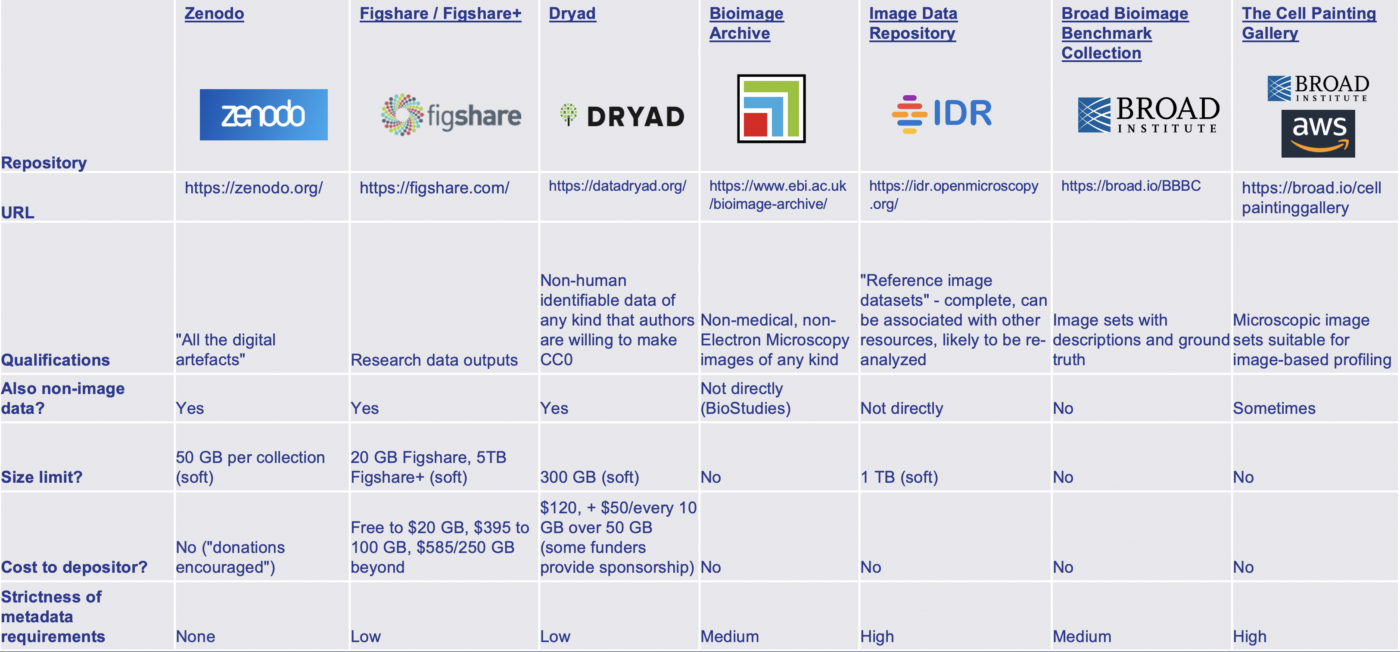
We recommend using BioStudies to centralize all your publication’s data. It acts as a hub for linking to external databases and repositories, such as Bioimage Archive and Zenodo, and can host unique datasets or metadata that do not fit anywhere else.